
Table of Contents
- Key Takeaways
- Start With the Right Support Tasks
- Build the AI Around a Reliable Knowledge Base
- Design Clear Escalation Rules
- Keep the Experience Human, Even When It Is Automated
- Measure Quality, Not Just Deflection
- Use a Hybrid Support Model
- What to Put in Place Before Launch
- Final Thoughts
Customer support is one of the clearest places where AI can create value. It can answer repetitive questions instantly, reduce wait times, and help teams handle more volume without hiring at the same pace. But automation also creates a real risk: if customers cannot reach the right help, or if the AI gives confident but wrong answers, service quality drops fast.
The practical goal is not to replace support teams. It is to build a system where AI handles the predictable work, humans handle the complex cases, and customers move between both with minimal friction. Done well, AI can improve speed and consistency at the same time.

Key Takeaways
- AI works best in customer support when it handles repetitive, low-risk requests and leaves complex issues to humans.
- Service quality depends less on the model itself and more on the workflow, knowledge base, and escalation rules around it.
- Businesses should define what AI is allowed to answer, when it must hand off, and how failures are monitored.
- Hybrid support models usually outperform fully automated ones because they preserve speed without losing judgment.
- Quality control should include conversation review, knowledge base maintenance, and ongoing measurement of customer outcomes.
Start With the Right Support Tasks
Not every support request is a good candidate for automation. The best early use cases are high-volume, repeatable, and low-risk. These are the questions that do not require deep judgment, account-specific exceptions, or emotional nuance.
Good candidates for AI automation
- Order status updates
- Password resets and account access help
- Basic product information
- Store hours, shipping policies, and refund rules
- FAQ-style questions with stable answers
Poor candidates for early automation
- Billing disputes
- Technical troubleshooting with many variables
- Cancellation save attempts
- Complaint resolution
- Cases involving legal, security, or compliance concerns
The simplest rule is this: if a mistake would be expensive, sensitive, or hard to recover from, keep a human in the loop.
Build the AI Around a Reliable Knowledge Base
Most support failures are not caused by the AI model alone. They happen because the underlying information is outdated, incomplete, or inconsistent. If the support content is messy, AI will simply scale that mess faster.
A strong knowledge base should be the first investment. It needs clear ownership, version control, and regular review. Answer articles should use plain language, follow a consistent structure, and reflect the actual policy customers experience.
It also helps to separate content by intent. For example, a customer asking about a refund should be routed to a different article than one asking about return shipping, even if both appear related. Better structure reduces confusion and improves retrieval accuracy.
| Support Approach | Strengths | Weaknesses | Best Use Case |
|---|---|---|---|
| Rule-based chatbot | Predictable, easy to control | Limited flexibility | Simple FAQ flows |
| AI assistant with knowledge retrieval | More natural responses, better coverage | Needs clean content and monitoring | Tier-1 support and common questions |
| Human agent only | Strong judgment and empathy | Slower and more expensive at scale | Complex, sensitive, or high-value issues |
Design Clear Escalation Rules
One of the biggest mistakes in AI support is forcing the system to keep trying when it should hand off. Customers do not mind automation as much as they mind being trapped inside it. A good support experience gives them a clear path to a human when needed.
Escalation rules should be explicit. The AI should transfer a case when confidence is low, when the user asks for a person, when the issue involves account-specific decisions, or when the conversation repeats without resolution.
It is also useful to create “mandatory handoff” categories. These include fraud concerns, chargebacks, legal complaints, and any situation where policy ambiguity could create risk. The AI should recognize these cases early and stop pretending it can solve them alone.
Keep the Experience Human, Even When It Is Automated
Good support is not only about getting the answer right. It is also about making the customer feel understood. That is where many AI deployments fall short. They answer the question but ignore tone, context, or urgency.
Businesses can preserve a human feel by using shorter responses, acknowledging the issue directly, and avoiding overly robotic scripts. The AI should not sound like it is trying to impress the customer. It should sound useful, calm, and direct.

Another effective tactic is to make the transition to a human agent seamless. The customer should not need to repeat the same issue three times. When a handoff happens, the full context should move with it: the issue, the attempted resolution, and any relevant account details.
Measure Quality, Not Just Deflection
Many companies judge support automation by one metric: how many tickets the AI handled without human help. That matters, but it is not enough. A system that deflects tickets while frustrating customers is not a success.
Better measurement includes both operational and customer outcomes. Teams should track resolution rate, first contact resolution, customer satisfaction, escalation rate, and the percentage of AI answers that required correction. Review a sample of conversations regularly to catch failure patterns early.
It also helps to compare automated and human-handled cases side by side. If AI is reducing response time but increasing repeat contacts, the business has not actually improved service quality. The point is not simply to move volume away from agents. The point is to improve the full support experience.
Use a Hybrid Support Model
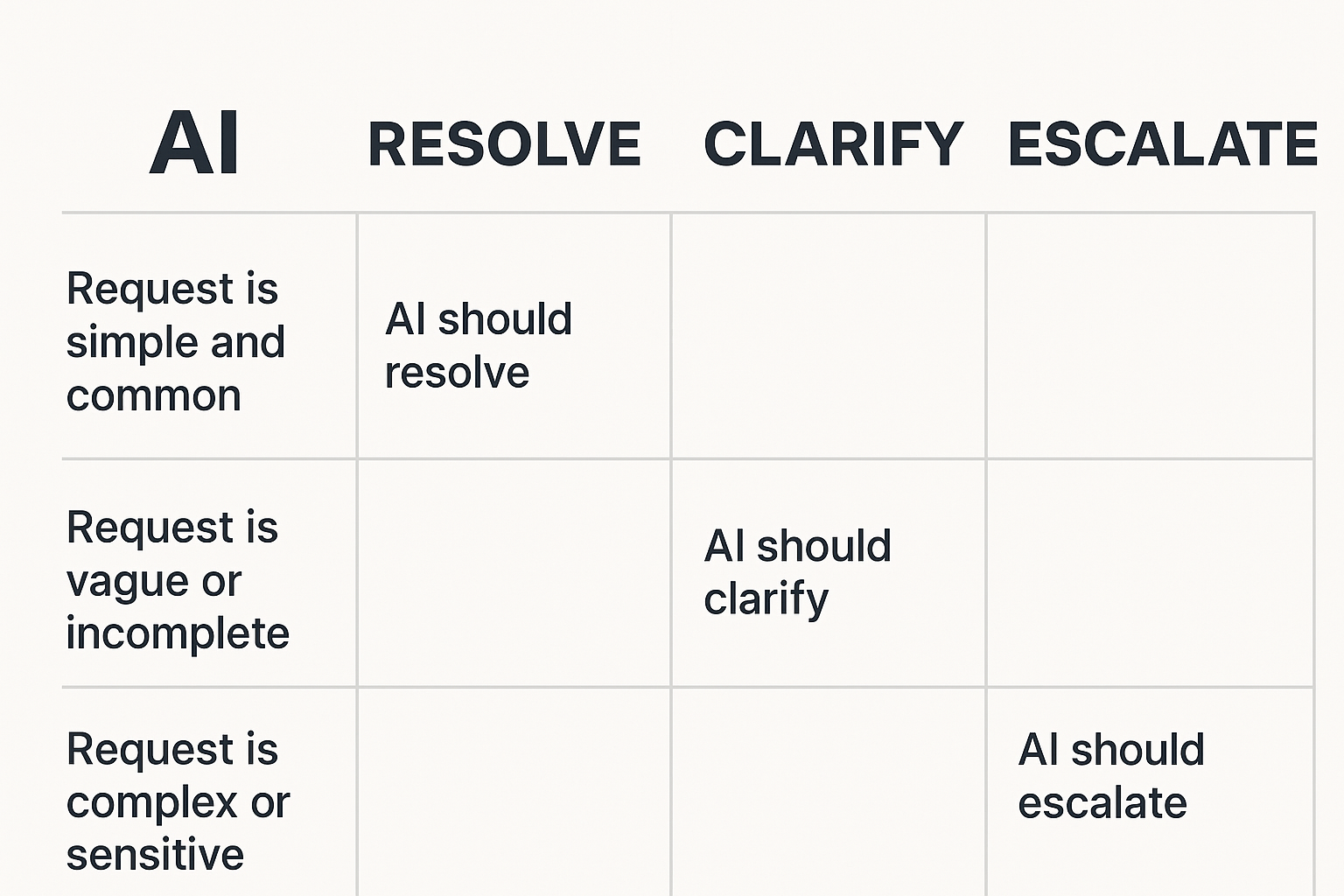
The most effective setups are usually hybrid. AI handles the front line, while human agents handle the exceptions. That model gives businesses speed, scalability, and consistency without giving up judgment or empathy.
A practical hybrid workflow often looks like this:
- The AI greets the customer and identifies the issue.
- It resolves simple requests using approved content and workflows.
- It asks clarifying questions when the issue is ambiguous.
- It escalates when confidence is low or the case is sensitive.
- A human agent receives the full context and continues the conversation.
This setup also lets support teams learn from AI interactions. The cases that fail, stall, or get escalated reveal where documentation is weak or where the product itself is causing confusion.
What to Put in Place Before Launch
Before turning on AI support at scale, businesses should run a controlled pilot. Start with a narrow set of intents, a limited customer segment, and a clear review process. Measure outcomes for both quality and efficiency.
Three things matter most in launch readiness:
- Documented answer sources and approval ownership
- Escalation paths that are easy for customers to use
- Quality review for transcripts, corrections, and edge cases
It is also smart to train agents on how the AI works. When support teams understand its limits, they can correct issues faster and spot patterns in customer frustration sooner.
Final Thoughts
AI can absolutely improve customer support, but only when it is treated as part of a service system rather than a shortcut. The businesses that get the best results are the ones that use AI to remove repetitive work, protect the human team for complex cases, and measure quality with the same seriousness as efficiency.
In other words, the winning strategy is not automation at any cost. It is automation with clear guardrails, strong content, and a customer-first handoff process.